One car’s race on a page
17 November 2026
Any car in any session with laps now has its own page: its pace against its class lap by lap, its place through the race, its stints ranked in the class and what each stop cost.
MoreLess
Open a race or session, tap a car, and follow “This car’s race”: a page for that one car, made to share.
It sets the car beside its class (time on track, pace, time lost to stops, laps), draws every lap against what the class was lapping at that moment, so rain or a yellow does not skew it, and shows its place in class through the race. For endurance races it lists each stint with its rank among the class’s stints and each stop with what it cost in time, laps and places.
It works for sprint races, qualifying and practice too, wherever the timing has laps.
New series: ICSCC
15 November 2026
Pacific Northwest club racing from the International Conference of Sports Car Clubs: every race and qualifying session, every car's laps, class by class.
MoreLess
ICSCC, the International Conference of Sports Car Clubs, joins the site: club road racing at Portland, Pacific Raceways, the Ridge, Spokane, Mission and Oregon Raceway Park.
Every qualifying session and race is here with each car's laps, class results, lap leaderboards and driver pages, from 2023 to now, with earlier seasons back to 2008 being added over the next few hours.
Live: each class's results at the checkered flag
15 November 2026
When the checkered flag falls, live pages list the top cars in every class: the top 3, or the top 5 in a bigger race.
MoreLess
When the checkered flag falls, a live page lists the leading cars of each class with their gaps to the winner: the top 3, or the top 5 when the race has a class of 10 cars or more. **Show all** lists every car in a class with its laps, gap, interval, best lap and stops, and **Show overall** lists the whole field with each car's class.
They are provisional until the official results are in.
Live: a stint clock, and Lucky Dog's two hours
15 November 2026
Live pages show how long your car has been out since its last stop. At Lucky Dog races it counts down the two hours to the next mandatory stop, from yellow to red.
MoreLess
The board on a live page now has a **This stint** box: the time since your car's last pit stop (or the green, or the restart after a long stoppage), counting every second, with its laps and stops under it.
At Lucky Dog races it also counts down to the rule's two hours between five-minute stops. It turns yellow with 20 minutes left, orange with 10, red with 5, and flashes red once you're over. Under a full-course yellow, the cheapest time to stop, it flashes with 30 minutes or less left: "Yellow: pit now?" Only a stop of about five minutes restarts the clock, so a short black flag or a quick driver change doesn't. The timing doesn't show the moment a car leaves the pits, so the time left errs on the short side.
A red flag no longer counts as a pit stop for every car on track, so stints, stop counts and pit time lost are right across one. Refresh an open live page to get it.
Race charts: time from the green along the bottom
14 November 2026
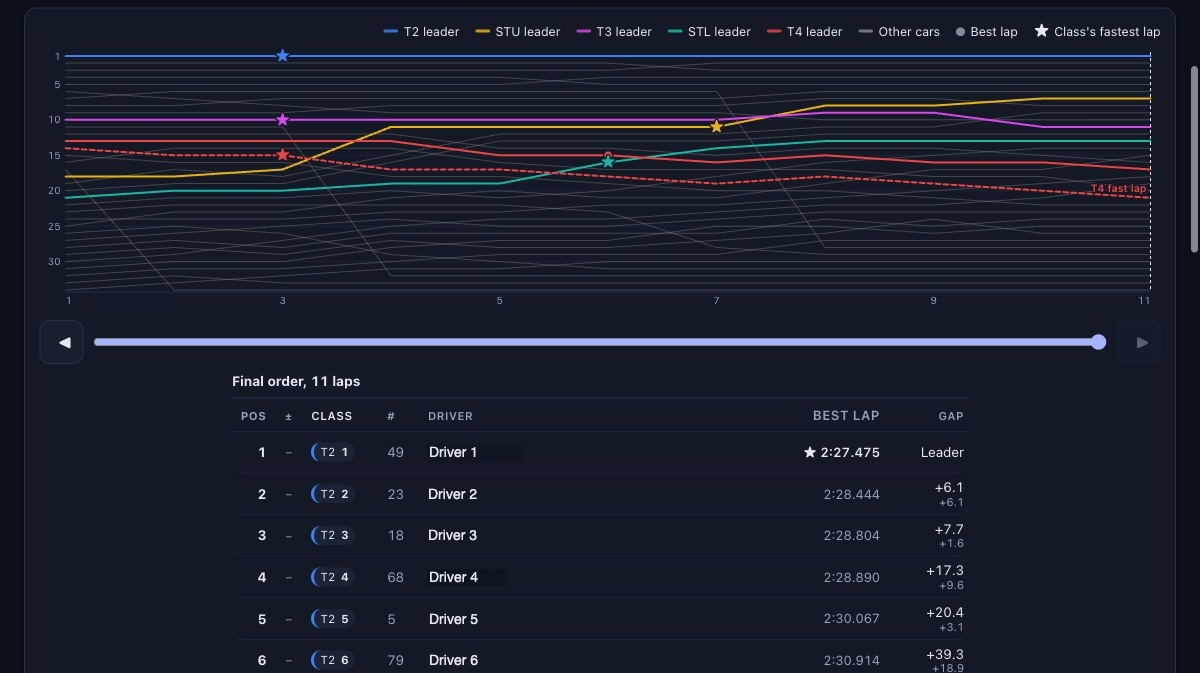
Every race chart now shows the race time since the green under each lap along its bottom, and a live race keeps the running order’s column headings in view as you scroll.
MoreLess
Along the bottom of every race chart, each lap now has the race time since the green under it: when the leader finished that lap.
On a live race on a wide screen, the running order’s column headings (Pos, Class, #, Driver, Lap, Gap, Best lap) stay at the top as you scroll down the list. Refresh a live page to get both.
Live: one class at a time, and every flag
14 November 2026
A live race can now be watched one class at a time and lists every flag; a weekend’s schedule shows start times on your own clock with a countdown.
MoreLess
On a live race, the new Class pills over the chart (All, then each class) make the whole page that class’s: its cars alone in the chart, each in its own color, the running order, the recap and the car picker, with places and gaps within the class. No car needs to be picked.
On a live race, click the flag (or Flags in the recap) for the list of every flag so far: when it came out, when it ended and how long it stood. Coming out of a yellow the page says a possible green until the field is back up to pace.
A weekend’s schedule on the Live page now shows each session’s start on your own clock beside the track’s, counts down to it, and lists sessions that did not run on their own. Qualifying, practice and Time Trial sessions have a recap of who went quicker and moved up.
Live races on each series’ page
13 November 2026
A series’ own home page now shows its races that are live or about to start, at the top, as the site’s home page does.
MoreLess
When a series has a race or session on track, or one about to start, its own home page now leads with it: the flag, the race clock, the lap and the leader, with a button to watch it live. A series’ page shows that series’ races alone; the site’s home page and the Live page still list every one.
Live practice and qualifying
13 November 2026
On a sprint weekend every group’s session is now live on its own page: practice, qualifying, Time Trial and HPDE ranked by best lap, races as before.
MoreLess
A sprint weekend runs a session a run group: practice, qualifying, then the races. Each of those is now followed live on its own page, and the Live page lists a weekend’s sessions together under the weekend’s name.
Time Trial and HPDE groups are followed too. Practice, qualifying, Time Trial and HPDE sessions are ranked by best lap: pick your car to see its place in class, its best lap, how far it is off the car ahead and clear of the car behind, and every lap as it is set on the chart. Races work as before.